Road Closure
Region availability: Melbourne
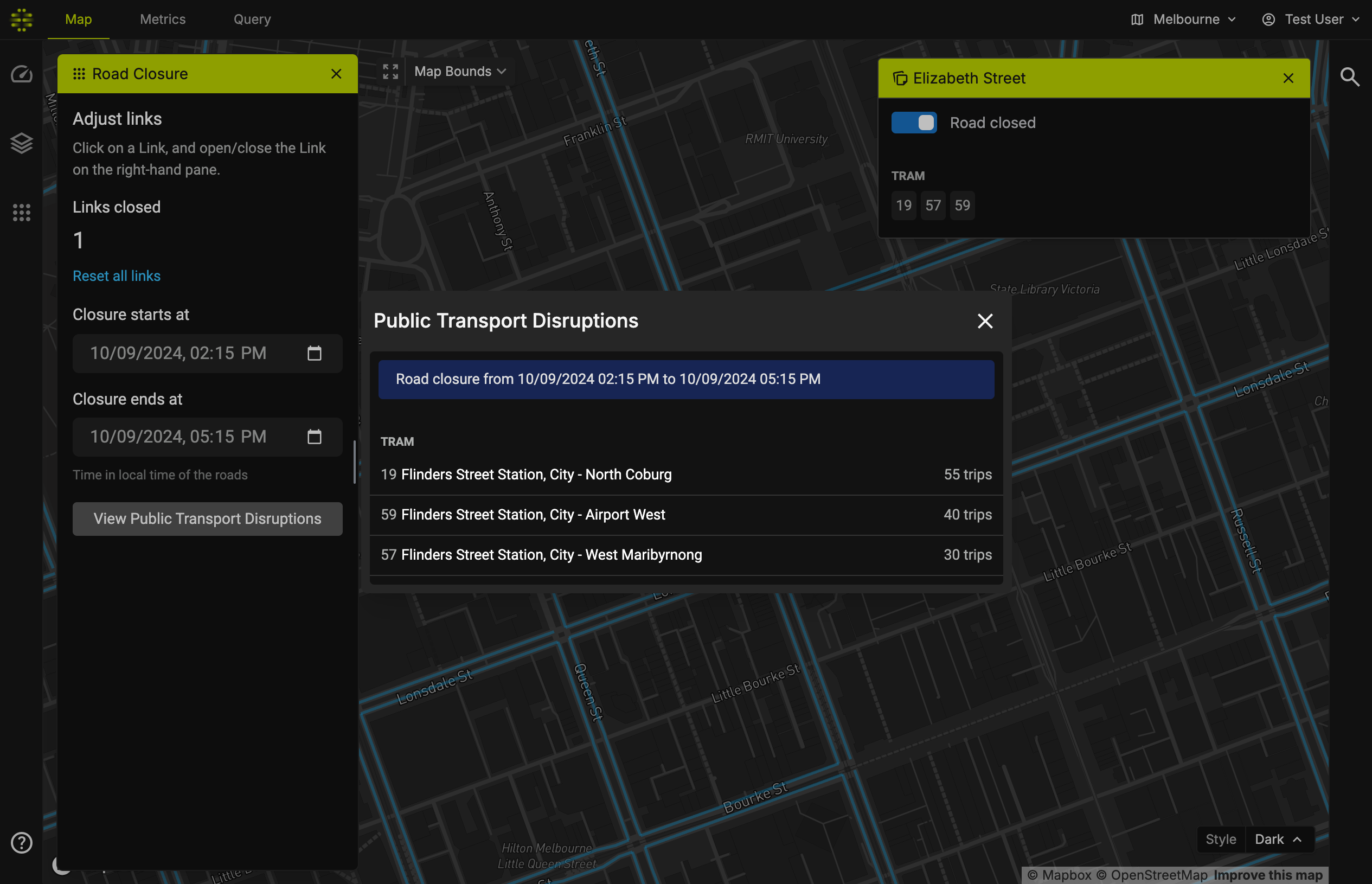
Road Closure allows you to see affected Public Transport routes when you close a particular Link. It will give you which routes are disrupted, along with the estimated number of trips.
How to use
- To close some Links, click on the Link. A popup will appear on the top-right corner. Then, check the "road closed" option.
- The popup will also show which tram and bus routes go through that particular Link.
- Then, set the time when the closure starts and ends.
- Click on "View Public Transport Disruptions"
- A popup will appear, listing all affected routes and estimated number of trips.
Note on Public Transport Data
Public transport routes and timetables can change over time; routes may be disrupted, or special event services may be in place. Most transport authorities publish an updated route and timetable via GTFS.
While it is possible to get real-time data on routes and timetables from the respective transit authorities, currently we have not implemented such process. Instead, we consider the GTFS data as a static data.
The GTFS feed we have on the platform is retrieved from transitfeeds.com, dated for 28 December 2023 until 31 March 2024.